












Skip to content

Thirteen creative studios. One lens.

Edit photos, video and music, draw plans, sign PDFs, design QR codes and run your projects. Free, on your Mac and in the browser. And your own AI can work with you inside every app.

Scroll to enter the lens
MCP connection

Whether or not you know these apps, you create from day one.

MCP is an open standard that connects your AI to the app's real tools, like a universal plug. You talk normally; your assistant picks the tool, uses it and leaves you a result ready to edit.

You

Make me a Black Friday post with my logo, a purple background and “30% off”.

Your AIClaudeor any MCP-compatible assistant
Foto·Uses the app's tools

Waiting for instructions from your AI…

  • new_document
  • place_image
  • add_shape
  • add_text
  • export_image
Result

1080 × 1080 post ready, in 4 layers.

If you're not an expert

You don't need to know where every button is. Say what you want in your own words, watch it come together step by step and learn by looking at the result.

If you're already an expert

Chain twenty steps into one instruction and hand off the repetitive work. Your judgment decides; the AI executes and you refine the detail.

The connection is free and you set it up once. You pay for your AI with your own account; everything it does stays editable in the app.

One app for every idea.

Each studio does one thing really well. They all share your account, your files and your AI.

Foto Meier Studio

The family's image editor: layers, retouching and developing, with Iris to generate.

  • Layers with styles, masks and blend modes
  • RAW developing, HDR and portrait retouching
  • Export for every social network at once
See everything it does Foto Meier Studio Also in the browser
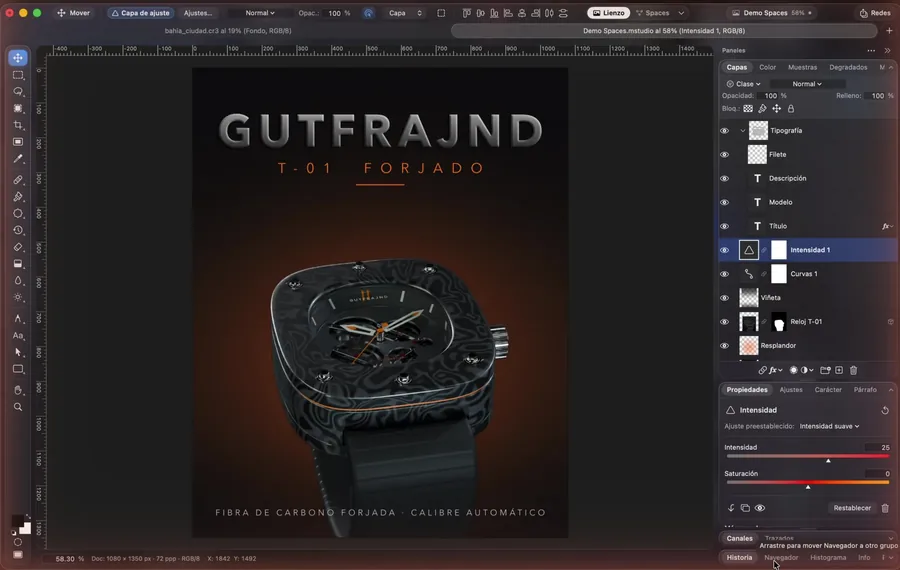
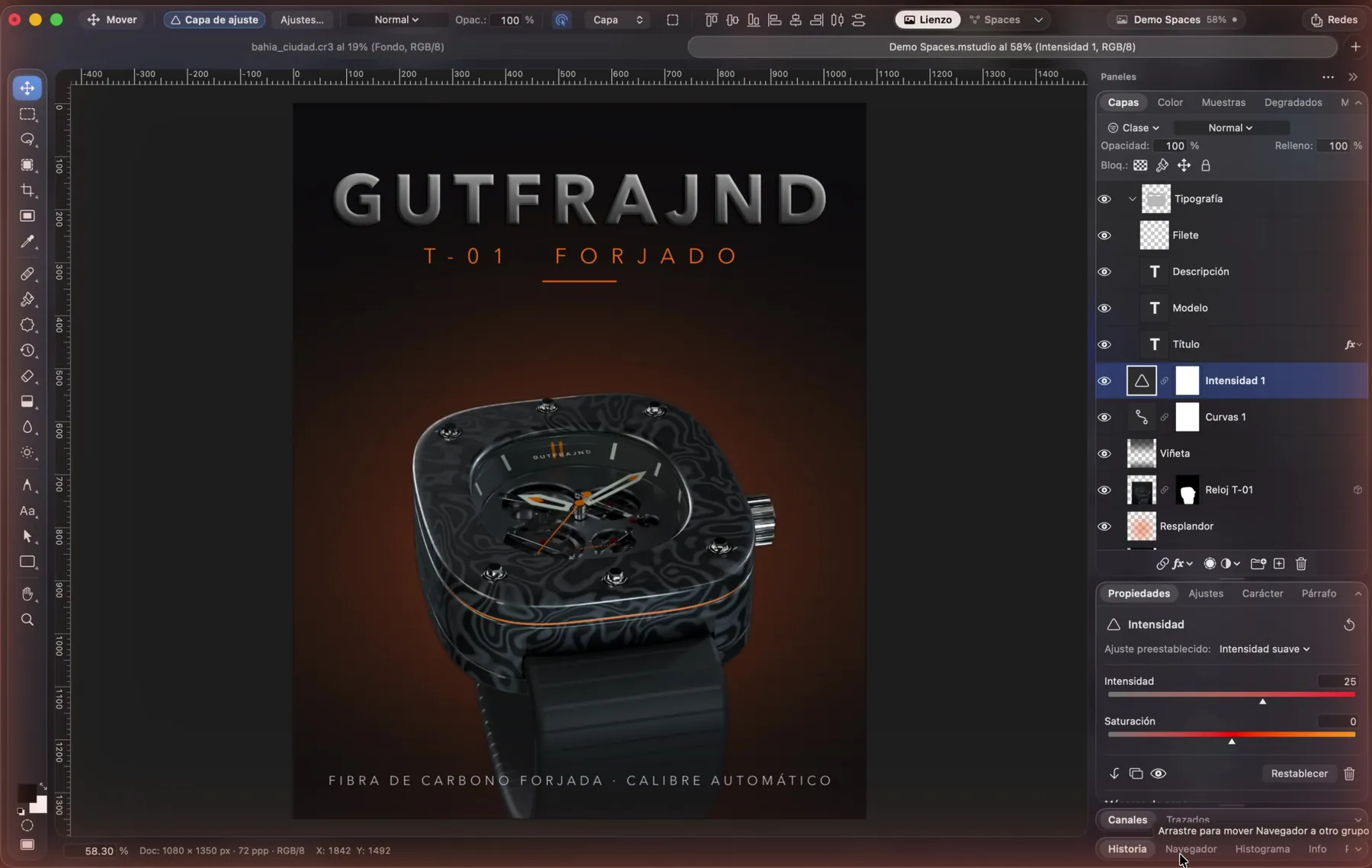
Foto Meier Studio editing a watch cover in layers
See it in action
Remove the background in one clickCut out the person and drop in a new background, no manual tracing.
RAW developingExposure, curves and color for your RAW photos, with a live histogram.
Merge to HDRBlend several exposures into one photo with both sky and shadows.
Type and layoutTypography and layers for product covers and ads.
Layer stylesShadows, bevels and glows you can change any time.
Portrait retouchingFine-tune skin, light and framing with precise controls.
Meier Credits
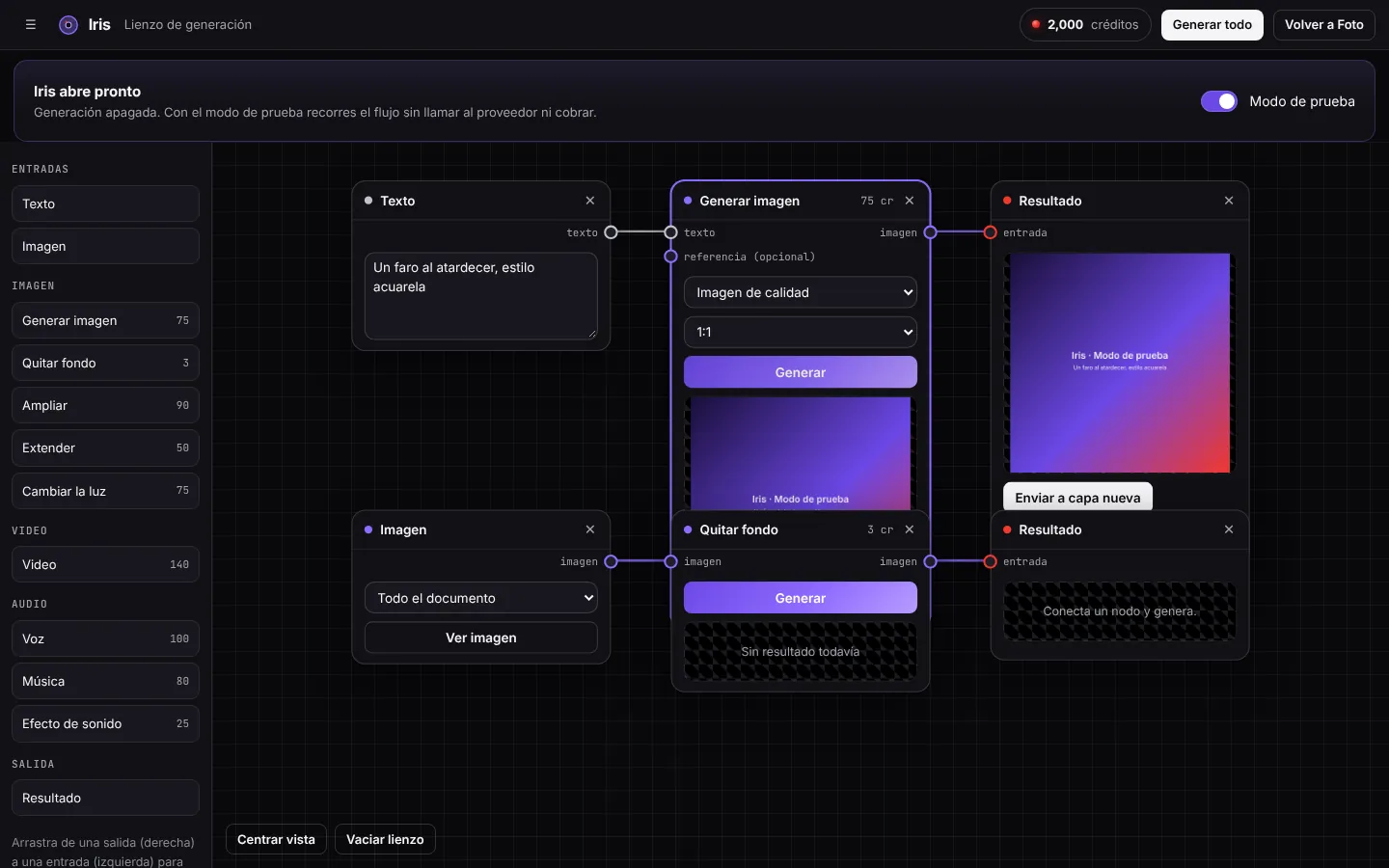
Iris: generate with nodesConnect your photo, describe the scene and generate new product shots.
Export for every networkInstagram, Facebook, YouTube and more: every size at once.

Video Meier Studio

Video editing with a professional timeline, color and animated titles.

  • 82 transitions and 57 effects
  • Automatic Spanish captions
  • 24 formats for 9 networks, with automatic reframing
See everything it does Video Meier Studio
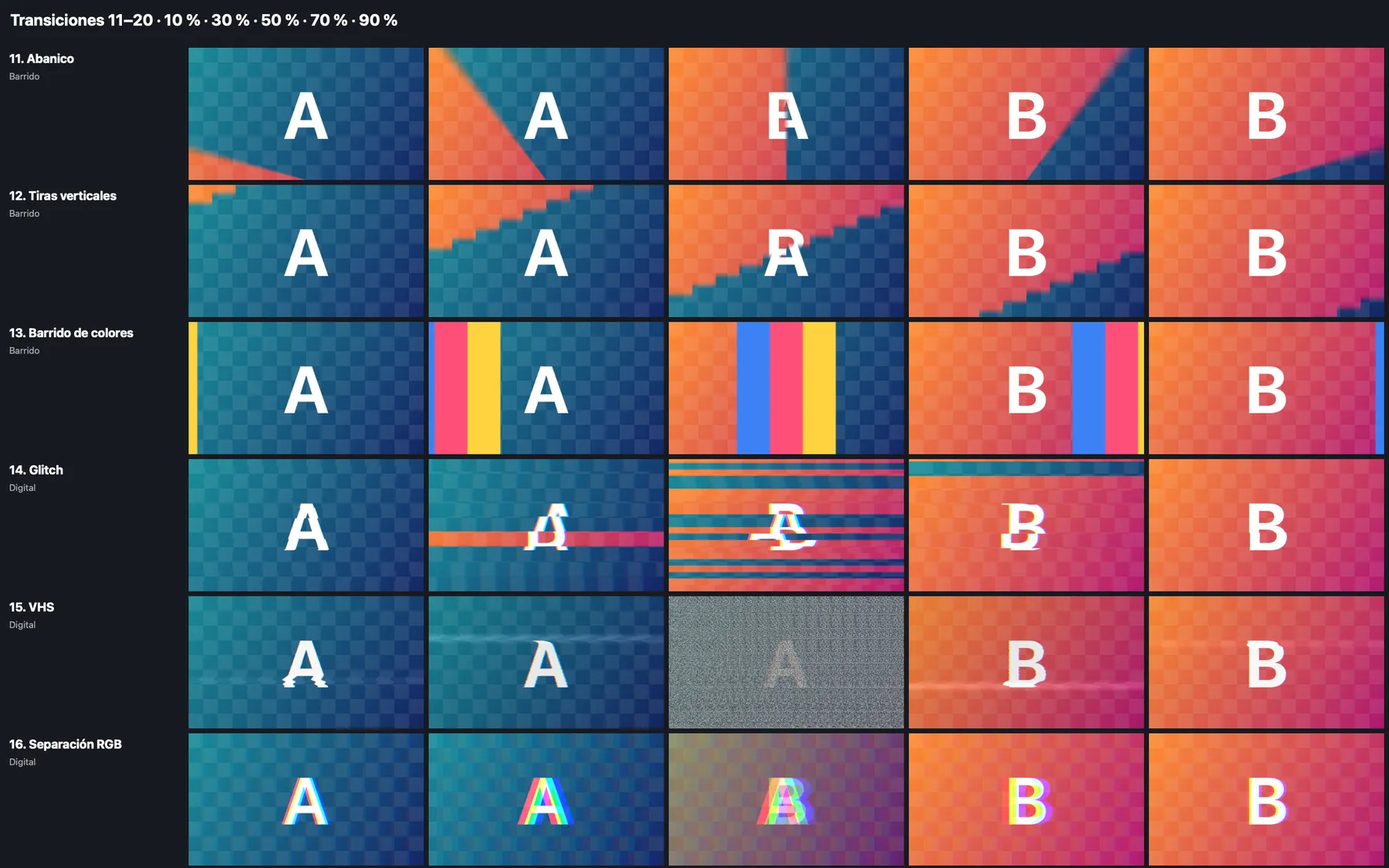
Video Meier Studio transitions catalog
See it in action
One edit, every formatExport 16:9, 4:5 and 9:16 with automatic reframing for each network.
Automatic captionsTranscribes the voice and highlights word by word, ready for Reels.
Animated titlesMoving, gradient text that looks agency-made.
82 transitionsWipes, glitch, VHS, fans and more, between any two clips.
Lower thirdsAnimated name and title in 50 styles, for interviews and courses.

Tune Meier Studio

Compose, mix and DJ in one studio.

  • 128 General MIDI sounds plus our own synths
  • 130 patterns in 16 genres, from cumbia to techno
  • DJ mode with two decks and sync
See everything it does Tune Meier Studio
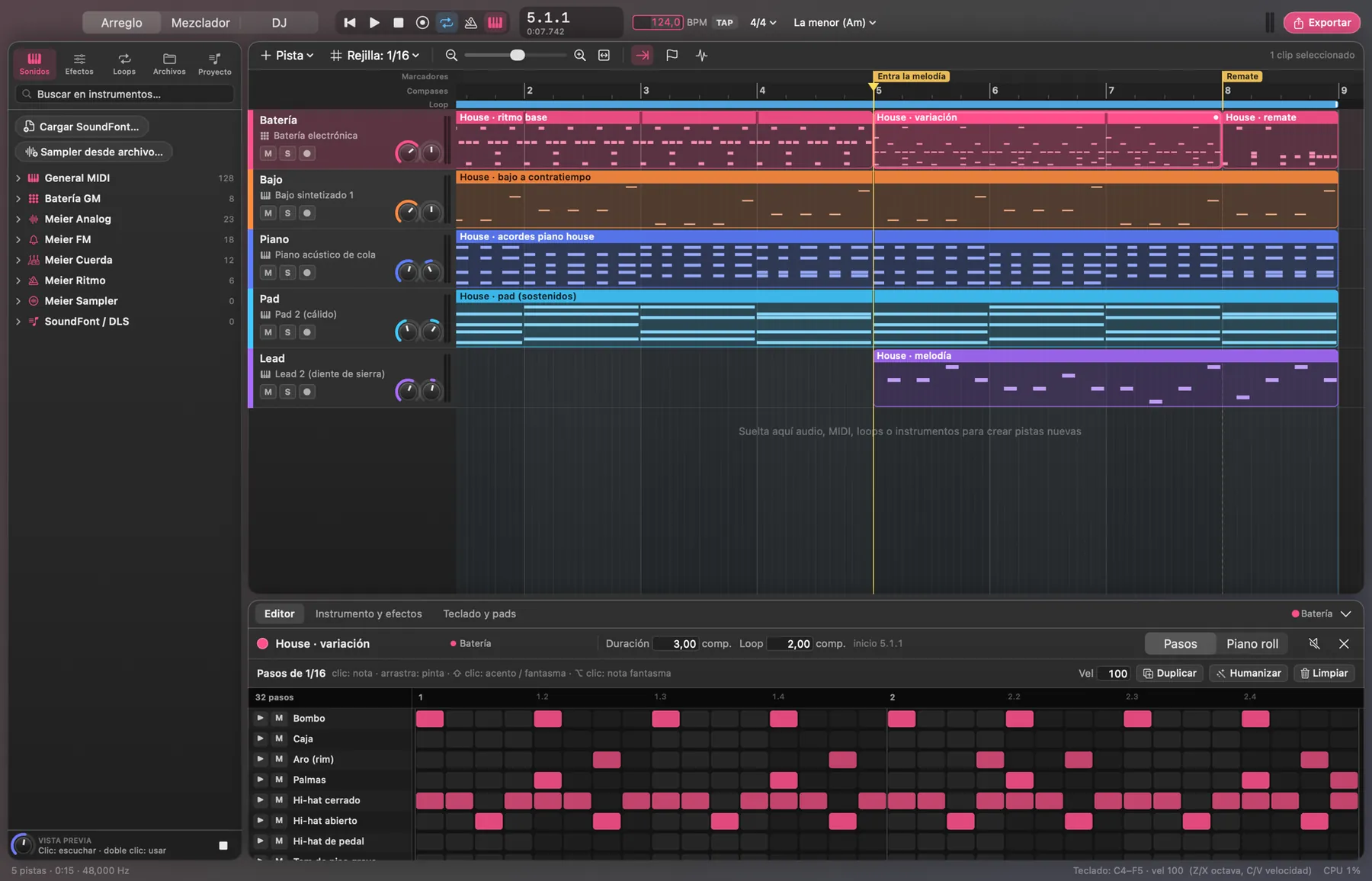
Arrangement of a house track in Tune Meier Studio
See it in action
Patterns by genreBuild a song in seconds with drums, bass and chords from 16 genres.
Piano rollEdit every note: length, velocity and quantize.
MixerVolume, pan and effects per track, like a real console.
Built-in synthOscillators, filter and envelopes to design your own sound.
Play liveRecord with your Mac keyboard or a MIDI one.
DJ modeTwo decks, BPM sync and effects to mix live.

CAD Meier Studio

2D technical drawing with a command line, layers and dimensions.

  • AutoCAD-style commands
  • Object snaps, grips and hatching
  • Opens and saves DXF
See everything it does CAD Meier Studio
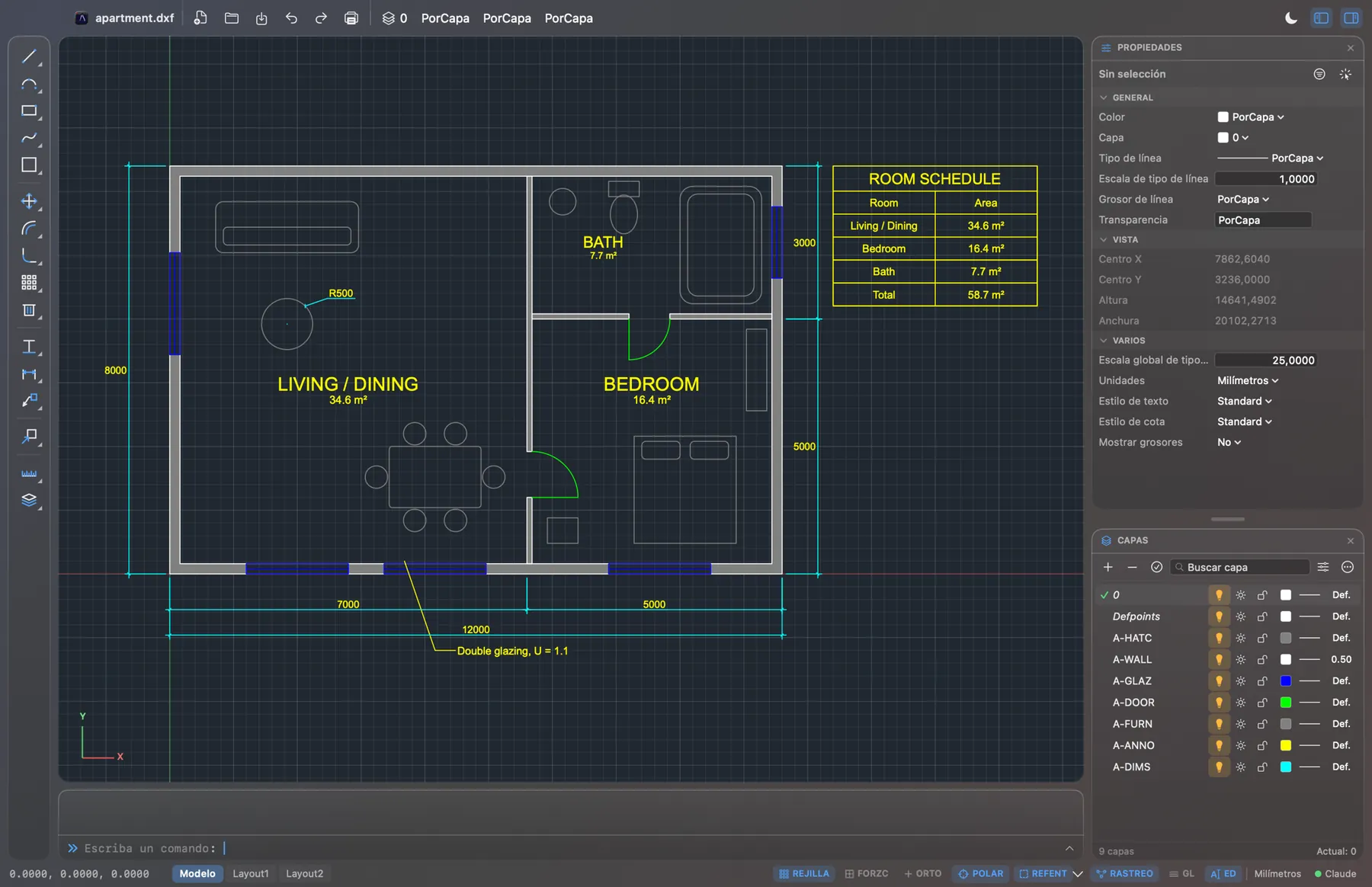
Apartment plan with dimensions and an area table in CAD Meier Studio
See it in action
Draw with commandsRectangle, offset, hatch and dimensions, typing the commands you know.
LayersHide furniture, dimensions or text in one click to present or print.
Opens DXFPlans from other programs with layers, blocks and area tables.
Quick selectSelect every matching block and change them all at once.
Print to scaleFrom model to an A3 PDF sheet, title block included.

PDF Meier Studio

Read, annotate, sign and organize your PDFs.

  • Highlights, notes, stamps and shapes
  • Signatures and forms
  • Combine and reorder pages
See everything it does PDF Meier Studio
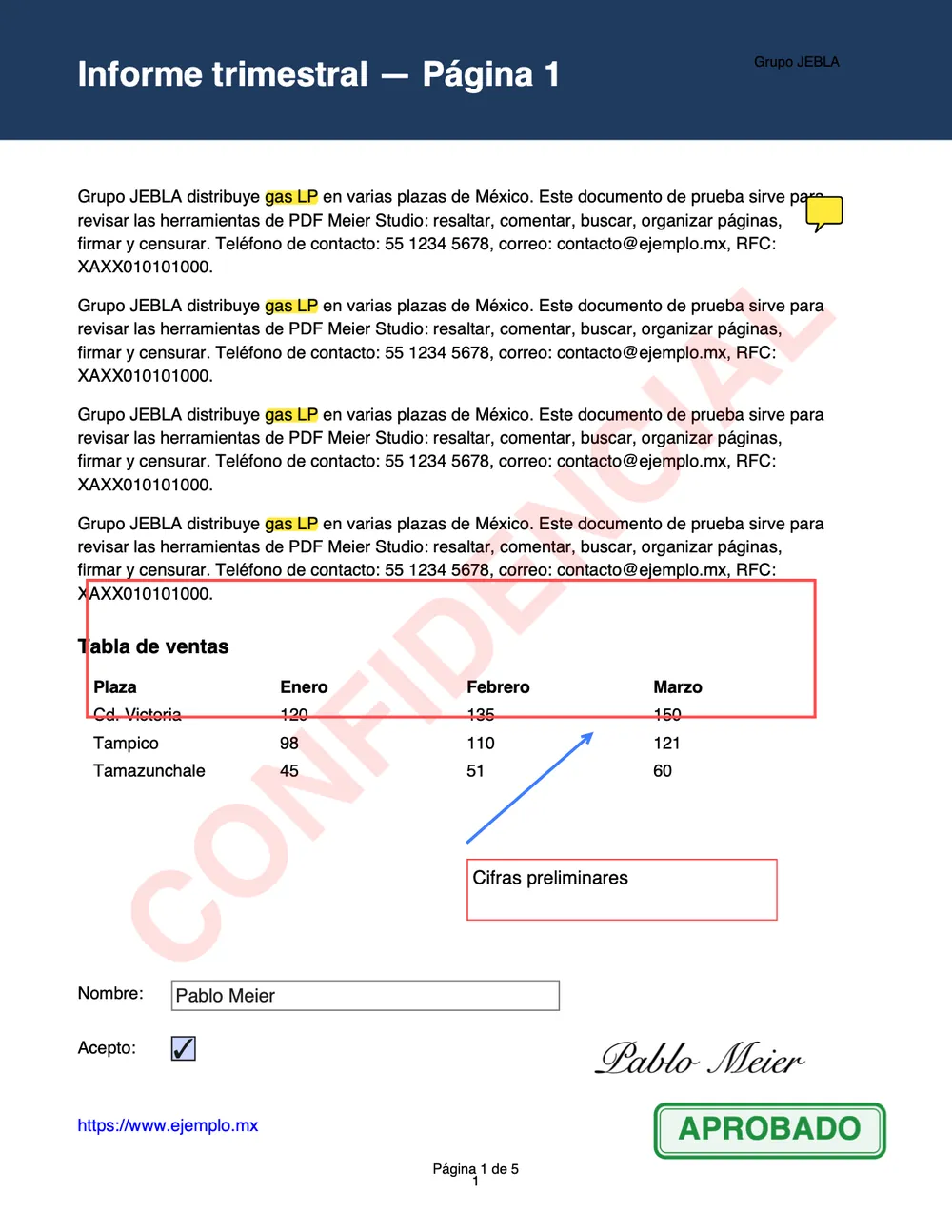
Report page with highlights, a signature and an approval stamp
See it in action
Annotate and approveHighlights, notes, arrows, stamps and a signature on the same file.
Real redactionBlack out phones and emails: the text is removed from the file, not just covered.
Digital signatureSign with a certificate and record who, where and when.
Booklet and 4-upArrange pages to print and fold, no math needed.
Compare versionsSee which text changed between two files, color-coded.

QR Meier Studio

Dynamic QR codes with full design and analytics for every scan.

  • 12 types: link, WhatsApp, Wi-Fi, contact and more
  • 32 templates, frames and your logo in the center
  • Rules by time, country, language and device
See everything it does QR Meier Studio
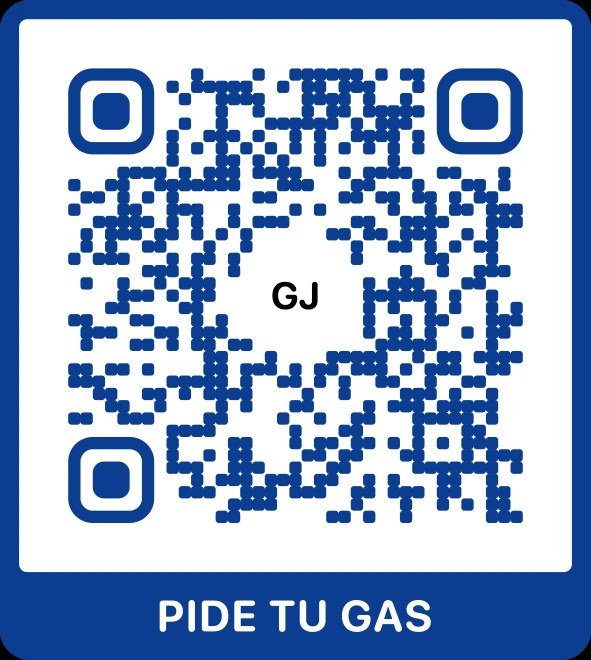
QR code with an “Order your gas” frame
See it in action
32 templatesGradients, neon, frames and seasonal: pick one and make it yours.
Your shapes18 module shapes, 9 eye frames and 14 eye centers, still scannable.
Frames that invite“Scan me”, menu, phone or polaroid, so people actually scan.
Pages, no codeContact, links, Wi-Fi or event: the QR opens a ready page.
Made by your AI
Flyers and labelsAn AI designed this flyer over MCP. The label sheet comes out as a PDF.

Escuela Meier

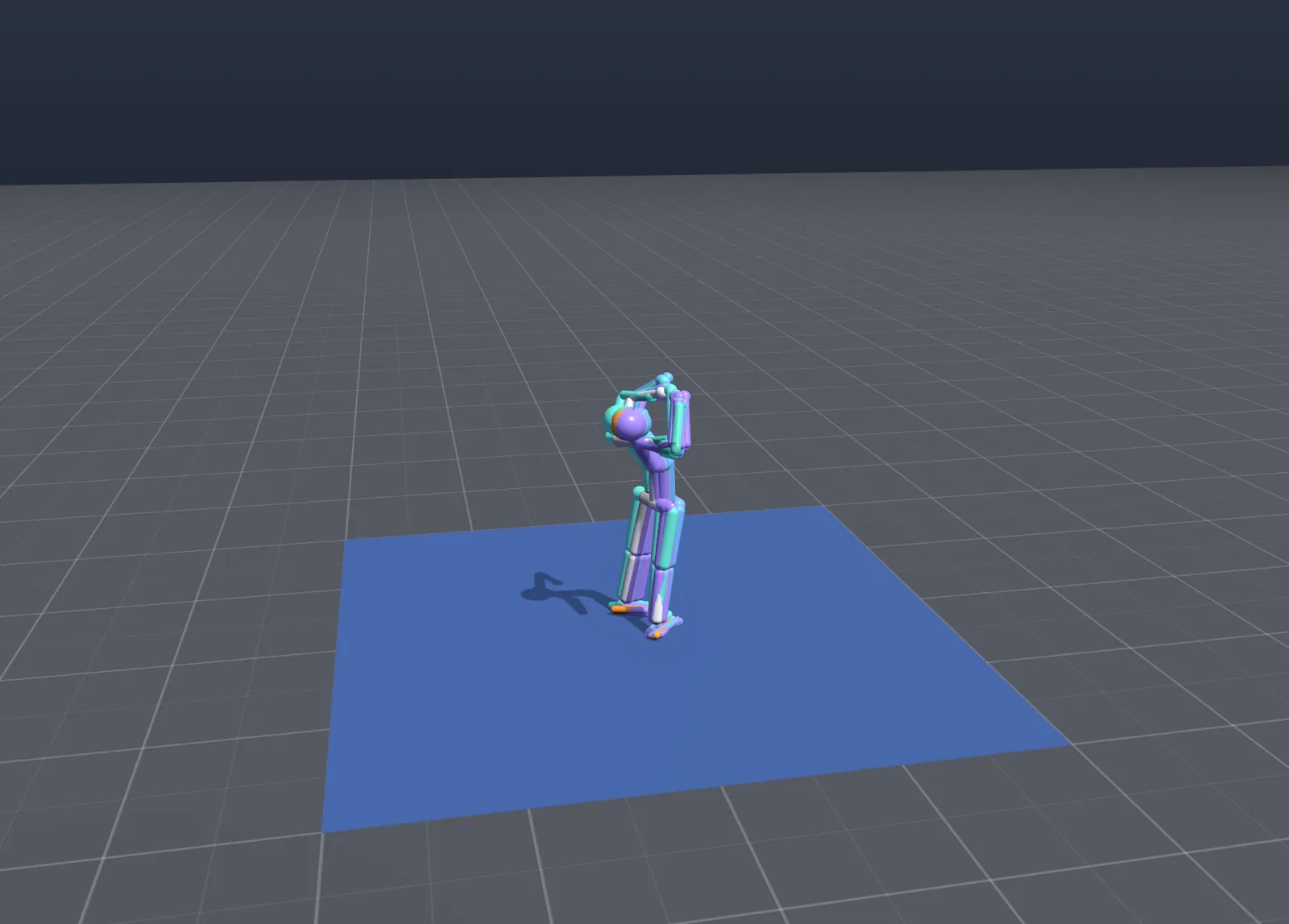
Teach a simulated robot to move, lesson by lesson, and watch it learn.

  • Schools with dozens of lessons, from standing up to a backflip
  • 34 practice scenarios
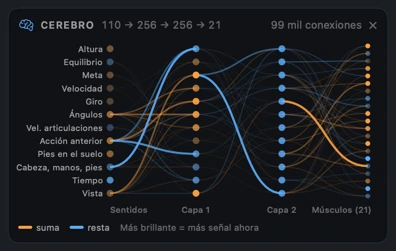
  • Its brain, live, while it decides
See everything it does Escuela Meier
Simulated robot practicing “Arms up” in Escuela Meier The robot's neural network with its connections lit up
See it in action
Learns as a herdDozens of students practice at once to learn faster.
34 scenariosHurdles, boxes, stairs and balls to practice on.
Its brain, liveWatch which connections light up as it decides each move.
Lesson by lessonFirst stand up; then walk, jump and do a backflip.
ExamOne student, no help, to see if it really learned.

Civil Meier Studio

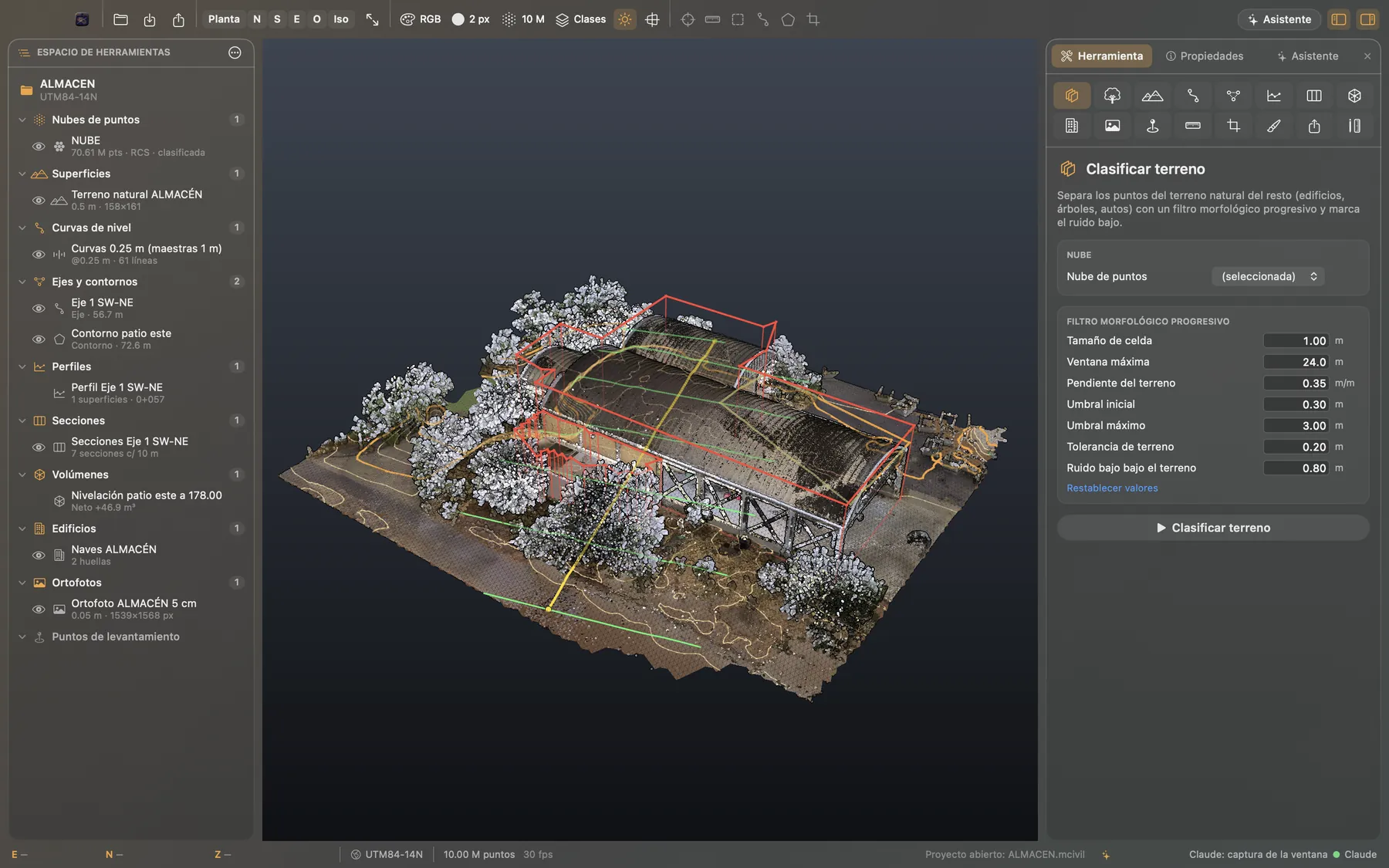
From point cloud to project: surfaces, contours, sections and volumes.

  • Opens RCS, RCP, LAS, E57 and more
  • Tens of millions of points, smoothly
  • Alignments, profiles, sections and earthworks
See everything it does Civil Meier Studio
Point cloud of a warehouse with contours in Civil Meier Studio Render of the same warehouse
See it in action
Point cloudsOpen scans with millions of points and fly through them smoothly.
Classify the groundSeparate ground, vegetation and buildings, then get the surface with contours.
Alignments and sectionsDraw an alignment and get cross-sections at every station.
Extract buildingsDetects roofs and heights, colored by elevation.
Site rendersPresent the project with realistic vegetation and light.

Hito Meier Studio

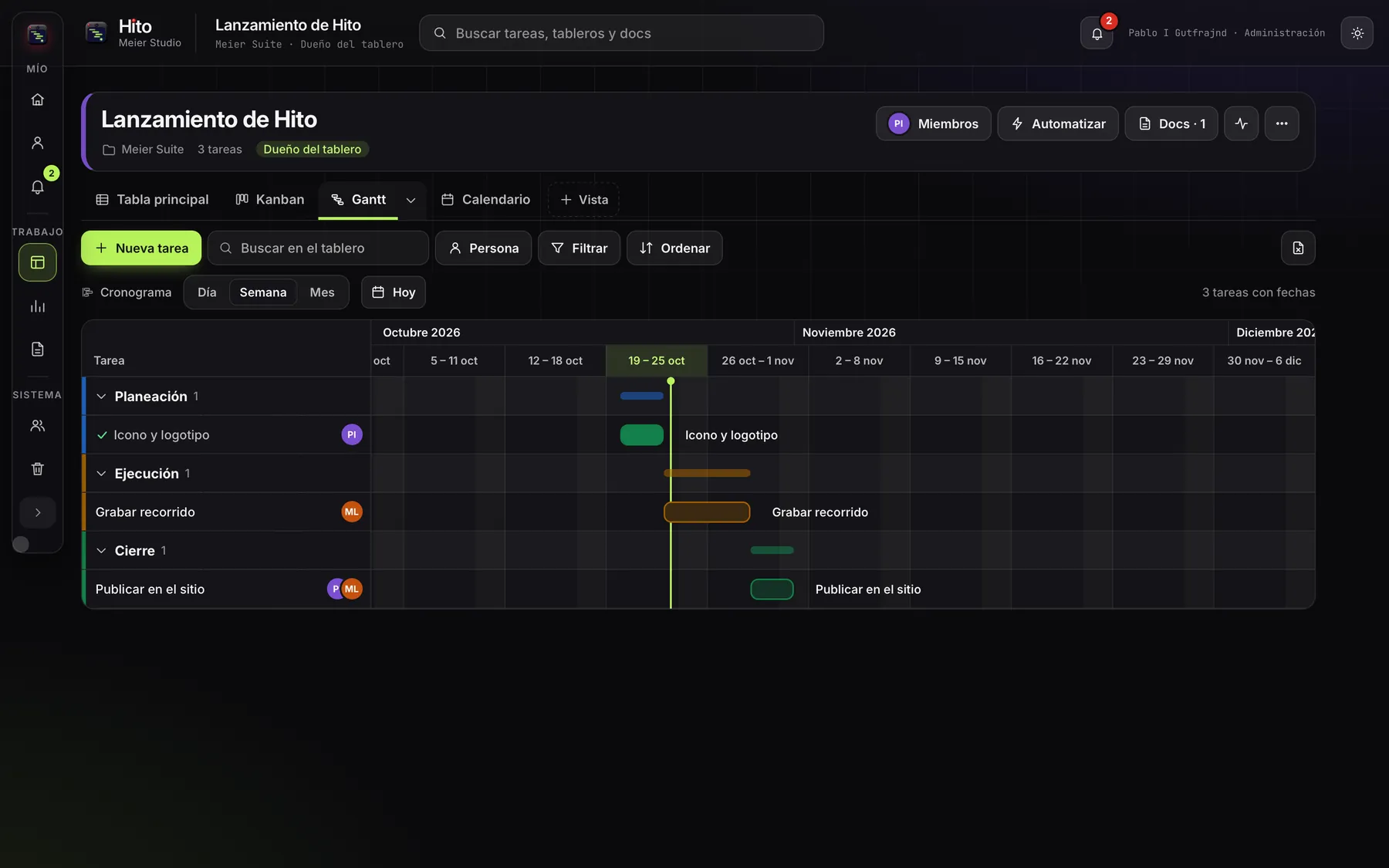
Project management with boards, tasks and timelines.

  • Table, Kanban, Gantt, calendar and map
  • Automations and dashboards
  • Docs inside every project
See everything it does Hito Meier Studio
Gantt schedule of a launch in Hito Meier Studio
See it in action
KanbanDrag cards between statuses and the team sees it instantly.
AutomationsMark it “Done” and Hito moves it to Closing and notifies the owners.
Gantt with dependenciesDates, progress and conflicts at a glance, by week or month.
Rule recipesWhen something happens, Hito does what you asked, on its own.
DashboardsMetrics, workload and due dates across several boards.
Project docsPlans with checkboxes and linked tasks, in one place.

Eco Meier Studio

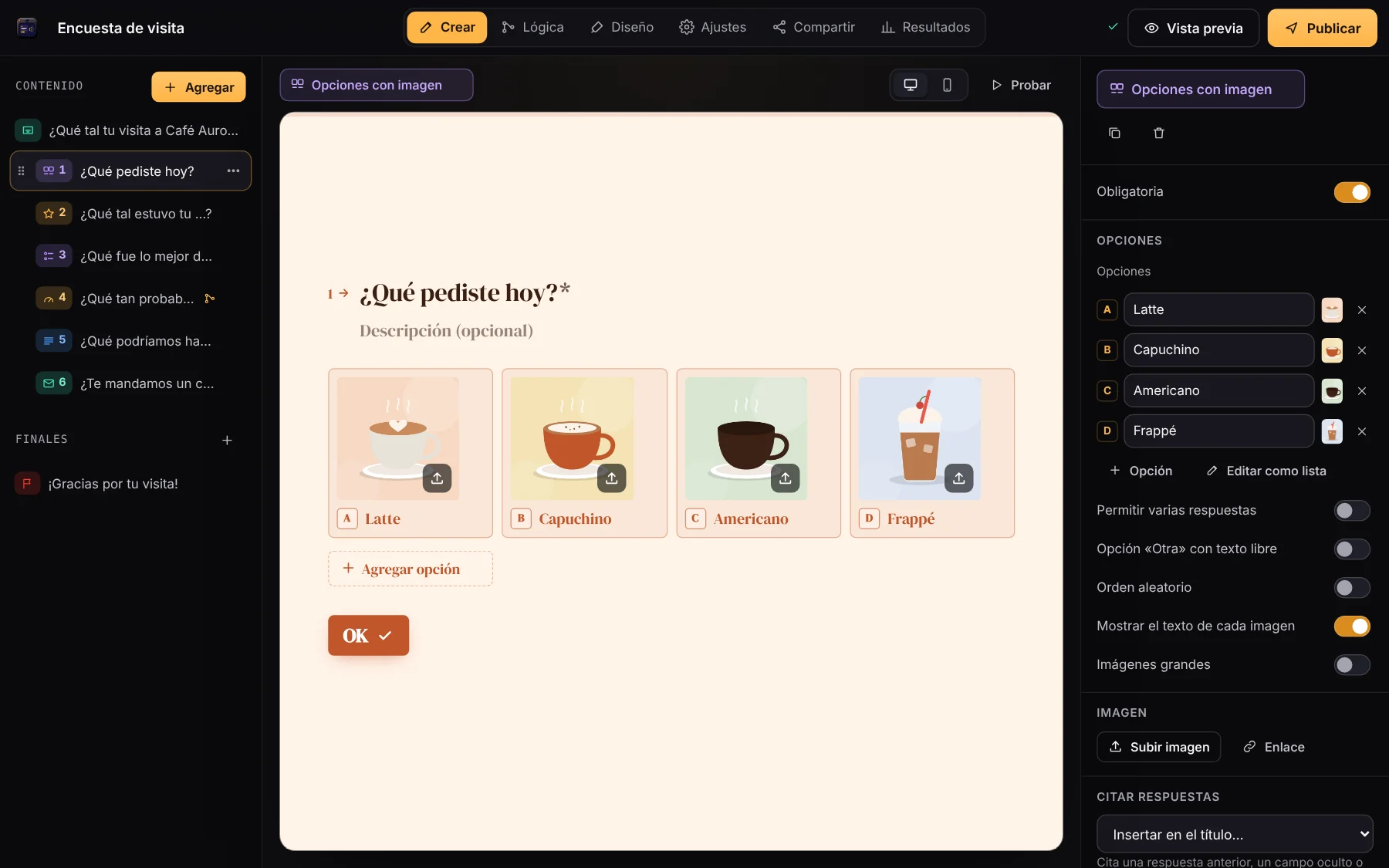
One-question-at-a-time forms and surveys.

  • Logic jumps, scores and variables
  • Branded themes, link, QR and embed code
  • Live results with drop-off per question
See everything it does Eco Meier Studio
Eco Meier Studio editor with a picture-choice question
See it in action
One question at a timeYour customers answer like in a conversation: photos, stars and NPS.
Type right on the canvasPick a question type and type directly; you see the result instantly.
Logic jumpsIf they rate low, ask what to improve. The map shows every path.
Your brand in one clickThemes, fonts, colors and background, previewed on desktop and phone.
Live resultsViews, response rate, NPS and the question where people leave.
Share it anywhereLink, QR, WhatsApp or inside your site as a popup or side panel.

Your AI works inside the apps.

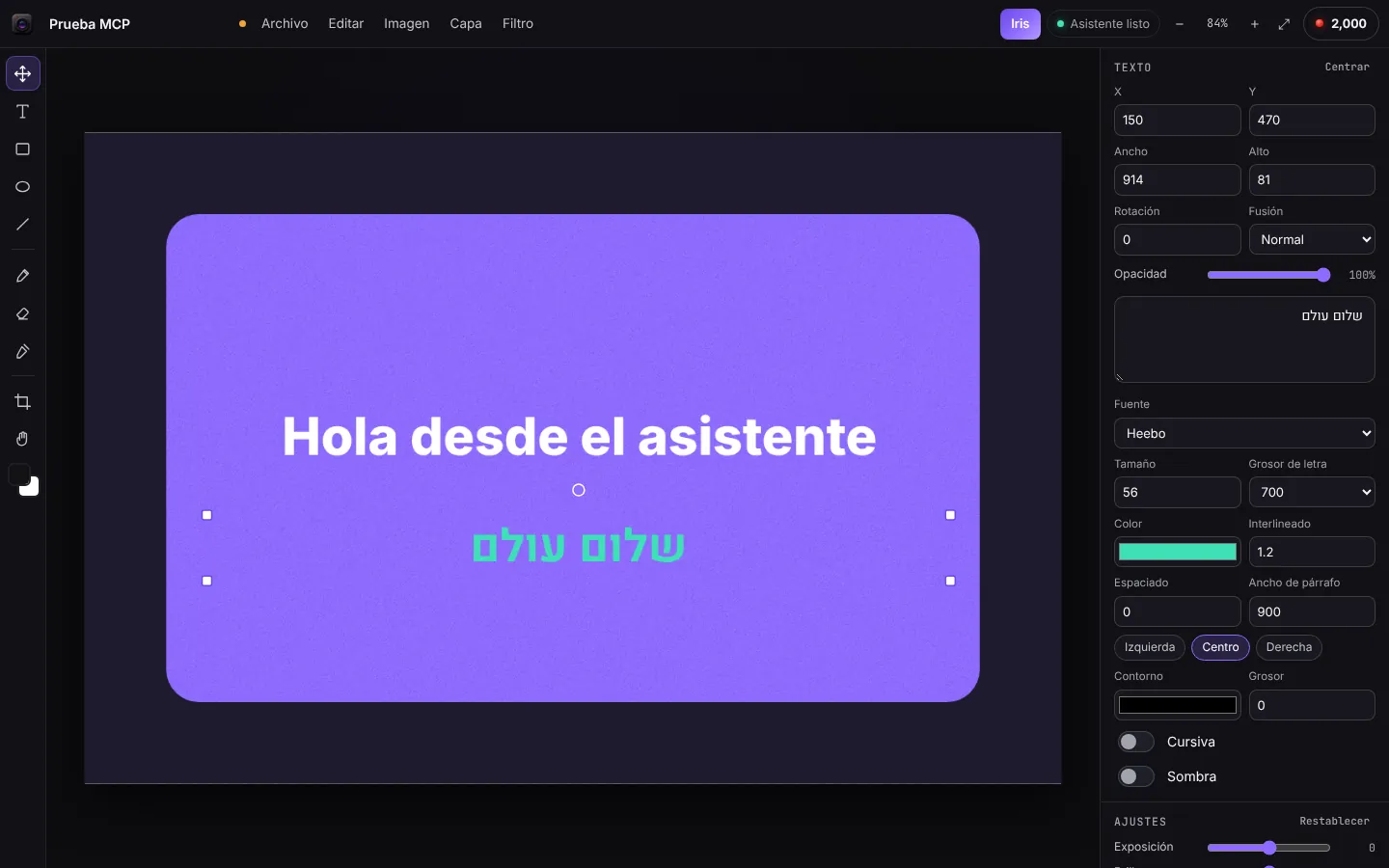
Connect Claude or any MCP-compatible assistant. You ask for what you want; it builds it in Foto with real layers you can keep editing by hand.

Make me a 1200 × 800 banner: dark background, a violet card, “Hola desde el asistente” and below it “שלום עולם” in green.
  1. new_document1200 × 800
  2. add_shaperect · #8E6BFF
  3. add_textHola desde el asistente
  4. add_textשלום עולם
  5. apply_filternoise
  6. save_documentMCP test
Done. I saved it to your files as “Prueba MCP”.
  1. Create a keyIn your account, under “Keys for your assistant”. One click.
  2. Paste it in your assistantAs a remote connector, with the address we give you.
  3. Ask for anythingWith Foto open in the browser, your assistant creates, edits, exports and saves.

The Mac apps bring their own connector too: Tune with 53 tools, Hito with 39, QR with 30 and CAD with 27, among others.

Free to create. AI, your way.

Editing costs nothing. For AI you have two paths: Meier Credits, if you want Iris to generate with more powerful models, or your own assistant connected over MCP.

Iris: text nodes, image generation and result
Iris: connect nodes and generate without leaving your document.
Free

Free, always

  • Every editing tool in every app
  • Save and open your documents from any computer
  • Connect your own AI
  • Spanish, English and Hebrew
Optional

With Meier Credits

Iris generates images, video, voice and music inside Foto. You pay only for what you use, at the same price the provider charges us, with no markup.

What you generateCreditsApprox.
Quality image75$2.07
Remove the background3$0.08
5-second video140$3.86
Voice, 500 characters100$2.76
30-second music80$2.21

Packs from $41.40 MXN, by SPEI bank transfer. Credits don't expire. Iris opens very soon.

MCP

With your AI

Connect Claude or any MCP-compatible assistant. It uses the apps' tools for you, and you pay with your own AI account, not with credits.

  1. Create a key in your account
  2. Paste it into your assistant as a connector
  3. Ask for anything, in your own documents
How to connect it

New in the family

Five apps joining the suite.

  • Eco

    Forms and surveys people answer like a conversation.

    In your browser now
  • Hito

    Boards, tasks and timelines, from idea to milestone.

    On Mac now
  • Tempo

    Your booking page: share your calendar and people book you, no back-and-forth.

    Coming soon
  • Colibri

    Team messaging: channels, direct messages, threads and calls.

    Coming soon
  • Ingenium

    Open any file and see inside it: format, bytes and structure.

    Coming soon

Start today. It's free.

One account for every app.

Sign up free