
 For agencies, project teams and business owners
Free project management software, with AI Everyone knows what's next. Without chasing anyone.
Boards, Kanban, Gantt, automations and docs in one place. Your AI turns meeting notes into tasks with an owner and a date, and keeps the board up to date.
Free account · No card · Delivered on launch day
- Free to edit
- 39 tools for your AI
- Español · English · עברית
Whether or not you manage projects, the project moves.
MCP is an open standard that connects your AI to the app's real tools, like a universal plug. You talk normally; your assistant picks the tool, uses it and leaves you a result ready to edit.
Plan my sister's wedding: tasks, dates and who does what.
Hito·Uses the app's tools
Waiting for instructions from your AI…
- create_board
- create_items
- update_items
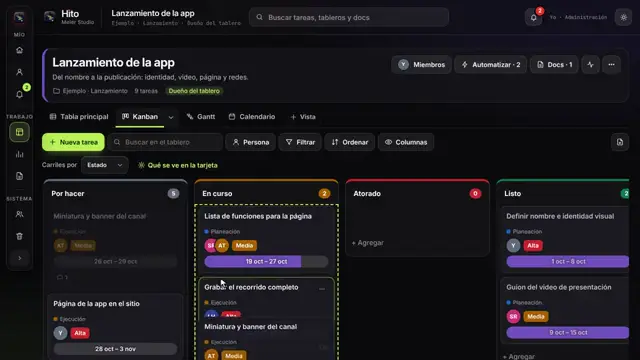
A board with 24 tasks, dates and owners.
Tell it the plan like you'd tell a person and your AI builds the board with tasks, dates and owners.
Automations, dashboards and reports in one sentence, and the board keeps itself current.
The connection is free and you set it up once. You pay for your AI with your own account; everything it does stays editable in the app.
“Where are we on that?” is the most expensive question of your week.
You walk out of the meeting and the board is ready.
Your assistant uses Hito's 39 tools: creates boards and tasks, assigns, sets dates, builds automations, writes docs and tells you what's at risk. The team just sees an up-to-date board.
What it does in the app, with the connector's real tools:
create_boardLaunchcreate_items9 tasksupdate_itemsowners · datessave_automationDone → Closing + notifymy_workdue this week
Before
- Turn notes into tasks
- Assign and set dates
- Chase updates
- Build Friday's report
With Hito + your AI
- Paste the notes
- Adjust priorities
- The board keeps itself current
You stay in charge: everything stays editable, and if you don't want AI, everything works by hand.
What you'll be able to do
Closing open loops brings peace of mind
A view for everyone
Table, Kanban, Gantt, calendar and map on the same data.Rules that work on their own
When something happens, Hito moves, assigns or notifies for you.The big picture at a glance
Dashboards across boards and docs inside the project.What everyone asks before saying “I want it”
What is Hito Meier Studio?
It's a project management tool with boards and five views over the same data (table, Kanban, Gantt, calendar and map), automations, multi-board dashboards and docs inside the project. It connects over MCP to your AI, which uses its 39 tools to create tasks, assign owners and keep the board up to date.
Is it an alternative to Monday, Asana or Trello?
It covers what those tools are used for most — boards, Kanban, Gantt, automations and dashboards — and editing is free for your team. What's different: your AI turns meeting notes into tasks with an owner and a date.
Does my team have to learn another tool?
The basics take minutes: cards, statuses and dates. And whoever doesn't want to log in gets the notifications.
How many people can use it?
Invite your team; editing and boards are free.
Is it really free?
Yes. The account and every editing tool are free. You only pay if one day you want Iris to generate images, video, voice or music with Meier Credits, at the provider's cost. It's optional.
Do I need to know about AI?
No. If you already use Claude or another MCP-compatible assistant, you connect it in three steps and talk to it like a colleague. If not, the app works fully by hand.
What happens when I say “I want it”?
You create your free account and join the Hito launch list. On launch day you'll find it in your account and we'll let you know. People on the list get it first.
Your team deserves to know what's next without asking you.
Save your spot for Hito for free and get it on launch day.
- Create your free accountThirty seconds. No card.
- You're on the Hito listYour spot is saved.
- It arrives on launch dayIn your account, before anyone else.
Free account · No card · Delivered on launch day