
 For producers, musicians and DJs
Free music production app, with AI Don't let the idea get away.
Compose, mix and DJ in one studio. Your AI lays down the groove in seconds, like a session player; you add what nobody else can.
Free account · No card · Delivered on launch day
- Free to edit
- 53 tools for your AI
- Español · English · עברית
Whether or not you produce, the music gets made.
MCP is an open standard that connects your AI to the app's real tools, like a universal plug. You talk normally; your assistant picks the tool, uses it and leaves you a result ready to edit.
I want a cheerful 30-second cumbia for my video.
Tune·Uses the app's tools
Waiting for instructions from your AI…
- new_project
- add_pattern
- add_chords
- export_audio
30 s of cumbia as an MP3, with the project open.
Ask for a style and a mood, and your AI lays down drums, bass and chords. You listen, ask for changes and learn how a song is built.
Use your AI as a studio assistant: routing, automation and mix analysis, while you bring the idea.
The connection is free and you set it up once. You pay for your AI with your own account; everything it does stays editable in the app.
Inspiration doesn't wait for you to finish setting up.
You're the producer. Your AI is your session player.
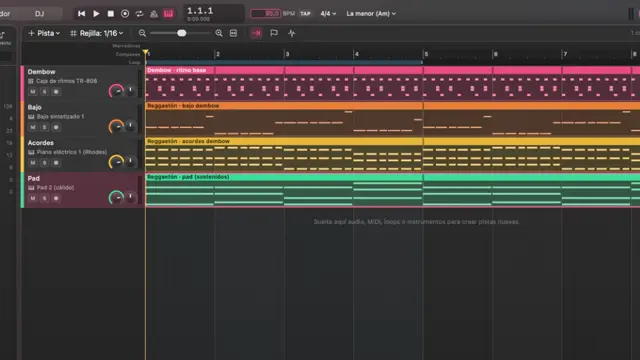
With 53 tools, your assistant creates tracks, picks instruments, writes chords and patterns, tweaks the mix and exports. Everything stays editable note by note.
What it does in the app, with the connector's real tools:
new_projectAm · 95 BPMadd_patternreggaeton · drumsadd_chordsAm F C Gset_instrumentbassadd_effectreverb · 18 %
Before
- Create tracks and load instruments
- Program the drums hit by hit
- Write chords and bass
- And the idea has gone cold
With Tune + your AI
- Describe the style
- Play on top
- Finish the song
You stay in charge: everything stays editable, and if you don't want AI, everything works by hand.
What you'll be able to do
A full studio, without building one
130 patterns in 16 genres
From cumbia to techno, ready to start and make your own.Your own sound
128 General MIDI sounds and synths to design yours.From studio to booth
DJ mode with two decks and sync to test your track live.What everyone asks before saying “I want it”
What is Tune Meier Studio?
It's a music studio for Mac (a DAW) to compose, mix and DJ: 130 patterns in 16 genres, 128 General MIDI sounds, synths and a DJ mode with two decks and sync. It connects over MCP to your AI, which uses its 53 tools like a session musician.
Is it an alternative to GarageBand or FL Studio?
It's a complete studio to start and finish ideas, with ready-to-use genre patterns and a DJ mode. You export audio and MIDI, so you can take your project to any other program whenever you want.
Is the music mine?
Yes. What you compose in Tune is yours; the AI only uses the app's tools on your behalf.
Can I take it to another program?
You export audio and MIDI to continue in whatever program you like.
Is it really free?
Yes. The account and every editing tool are free. You only pay if one day you want Iris to generate images, video, voice or music with Meier Credits, at the provider's cost. It's optional.
Do I need to know about AI?
No. If you already use Claude or another MCP-compatible assistant, you connect it in three steps and talk to it like a colleague. If not, the app works fully by hand.
What happens when I say “I want it”?
You create your free account and join the Tune launch list. On launch day you'll find it in your account and we'll let you know. People on the list get it first.
That half-finished project deserves an ending.
Save your spot for Tune for free and get it on launch day.
- Create your free accountThirty seconds. No card.
- You're on the Tune listYour spot is saved.
- It arrives on launch dayIn your account, before anyone else.
Free account · No card · Delivered on launch day