
 For online stores, brands and social media managers
Free online photo editor, with AI Photos that sell, without editing all night.
A professional layered editor, free and in your browser. Connect your AI, tell it what you need and it hands you real layers you can keep retouching.
Free account · No card · Use it today in your browser
- Free to edit
- 24 tools for your AI
- Español · English · עברית
Whether or not you design, you describe it and it's done.
MCP is an open standard that connects your AI to the app's real tools, like a universal plug. You talk normally; your assistant picks the tool, uses it and leaves you a result ready to edit.
Make me a Black Friday post with my logo, a purple background and “30% off”.
Foto·Uses the app's tools
Waiting for instructions from your AI…
- new_document
- place_image
- add_shape
- add_text
- export_image
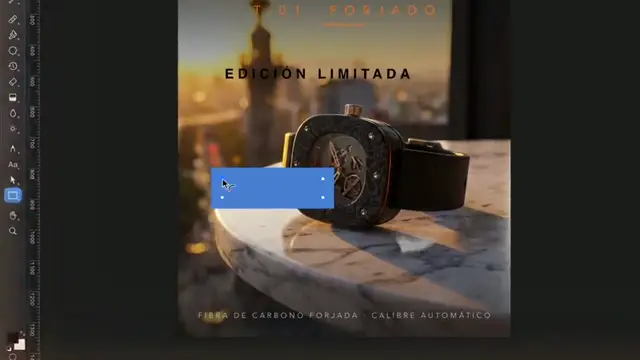
1080 × 1080 post ready, in 4 layers.
Describe what you want to sell and your AI builds the design in layers. You learn by seeing how it was put together, layer by layer.
Hand off the repetitive work, like duplicating, adjusting or batch exporting, and keep the fine eye for yourself.
The connection is free and you set it up once. You pay for your AI with your own account; everything it does stays editable in the app.
Every photo you don't post is a sale that doesn't happen.
You decide how your brand looks. Your AI does the grunt work.
With Foto open in your browser, your assistant uses the same tools you do: open, adjust, write, export and, if you ask, use Iris. Every step stays as a layer you can move or undo.
What it does in the app, with the connector's real tools:
open_filewatch.jpgiris_generateremove background · 3 creditsadd_shapegradient · #7C5CFF → #1B1430add_textLimited editionexport_image1080×1920 · 1080×1350
Before
- Open, select and cut out by hand
- Look up the brand colors
- Redo the layout for each size
- Export one by one
With Foto + your AI
- Ask in one sentence
- Review and tweak whatever you want
- Publish
You stay in charge: everything stays editable, and if you don't want AI, everything works by hand.
What you'll be able to do
Professional, without the complicated
Real layers
Styles, masks and blend modes, like the editors you already know.Every network at once
Instagram, Facebook, YouTube and more, at their exact size.Iris, if you ever need it
Generate product scenes with Meier Credits, at cost. If not, you pay nothing.What everyone asks before saying “I want it”
What is Foto Meier Studio?
It's a professional layered image editor that runs free in your browser: layers, masks, styles and blend modes, RAW development and export at the exact size of every network. It connects over MCP to Claude or another assistant, which uses its 24 tools to do the repetitive work for you.
Can it replace Photoshop or Canva?
For the daily work of a shop or a brand — layers, masks, text, RAW photos and social media pieces — yes, and with no license to pay. If your workflow already lives in another program, use Foto for the quick jobs and let your AI handle the repetitive ones.
Does it run on my computer?
Yes: it runs in the browser, on Mac, Windows or Linux. Nothing to install.
Can I open my usual files?
You open JPG, PNG and your RAW photos, and save your layered documents to your account to continue from any computer.
Is it really free?
Yes. The account and every editing tool are free. You only pay if one day you want Iris to generate images, video, voice or music with Meier Credits, at the provider's cost. It's optional.
Do I need to know about AI?
No. If you already use Claude or another MCP-compatible assistant, you connect it in three steps and talk to it like a colleague. If not, the app works fully by hand.
What happens when I say “I want it”?
You create your free account and open it right away in your browser. You also join the list to get the Mac version and every update first.
Your next photo can be ready before your coffee gets cold.
Create your free account and open it right now.
- Create your free accountThirty seconds. No card.
- You open Foto in your browserRight there, nothing to install.
- Connect your AI whenever you likeAnd get the Mac version first.
Free account · No card · Use it today in your browser